Tech Tips
The complete USB-C charging cable guide: wattage, data and durability
All USB-C cables look identical, but they are not. This guide explains wattage, data speed and build quality so you choose the right cable the first time.

- Match wattage to your device: 27W fast-charges any iPhone, 60W covers phones and tablets, 66W suits Android flagships, and 100W charges laptops. A 100W cable is the safest all-rounder because it also works at lower wattages.
- Charging vs data: a charging-only cable carries power at USB 2.0 data speeds. A data cable like the Gibutech 100W e-marker carries 100W charging, 20 Gbps data and 4K@60Hz video through one cable.
- Connector matters: iPhone 15+ and Android use USB-C; iPhone 14 and earlier use Lightning. Gibutech offers USB-C to USB-C, USB-C to USB-A and Lightning versions.
- Durability: braided nylon cables bend-tested to 30,000+ cycles outlast standard PVC cables many times over.
Every USB-C cable looks the same: a slim connector at each end and a length of cable in between. Yet two cables that appear identical can differ enormously in what they actually do. One charges your laptop at full speed and streams 4K video to a monitor. The other trickles power to your phone and cannot move a single file at modern speeds. The difference is not visible, but it is decisive. This guide breaks down the three things that actually matter: wattage, data, and durability.
What wattage USB-C cable do I need?
A cable's wattage rating is the maximum power it can safely carry. Using a cable rated below your charger and device means slower charging; using one rated at or above your needs means full-speed charging every time. Here is how the common tiers map to real devices:
Exhibit 1 — Cable wattage by device type
27WPhones Any iPhone, most Android at full fast-charge
60WPhones + tablets iPad, Chromebook, dual-device
66WAndroid flagships Super-fast Samsung, Huawei
100WLaptops MacBook Pro, Windows ultrabooks
| Cable | Max power | Best for |
|---|---|---|
| 27W Lightning to USB-C | 27W | iPhone 14 and earlier — full fast-charge |
| 60W USB-C to USB-A / dual-LED | 60W | Phones and tablets from older USB-A chargers |
| 66W USB-C to USB-C | 66W | Fast-charging Android flagships |
| 100W USB-C to USB-C (e-marker) | 100W | Laptops, tablets and phones — all-in-one |
The simple rule
If you charge a mix of devices, buy the highest-wattage cable you need. A 100W cable charges a laptop at full speed and automatically steps down for phones and tablets. One good cable can replace three.
What is the difference between a charging cable and a data cable?
Wattage is only half the story. The other half is data. A charging-only cable carries power but limits data transfer to USB 2.0 speeds (480 Mbps) and cannot output video. A true data cable carries fast charging, high-speed data and video output simultaneously.
This is where the e-marker chip matters. An e-marker is a small electronic chip inside the cable that communicates its capabilities to connected devices. Without one, a USB-C cable is capped at 60W and USB 2.0. With one, it unlocks the full specification.
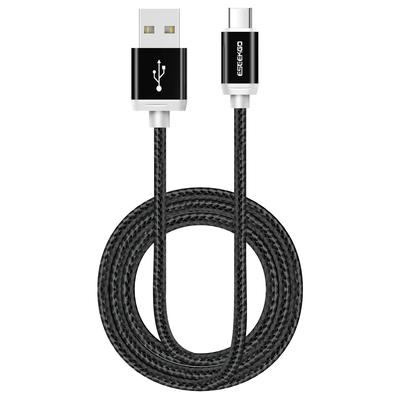
Gibutech 100W e-marker USB-C to USB-C data cable
100W PD 3.1 charging · 20 Gbps USB4 data · 4K@60Hz video output · braided nylon · the do-everything cable
Shop the Gibutech 100W e-marker USB-C to USB-C data cable
Exhibit 2 — What the e-marker unlocks
| Capability | Without e-marker | With e-marker (Gibutech 100W) |
|---|---|---|
| Charging | Up to 60W | Up to 100W |
| Data transfer | USB 2.0 (480 Mbps) | USB4 (20 Gbps) — 40× faster |
| Video output | None | 4K@60Hz to external display |
If you only ever charge a phone overnight, a charging cable is fine. But if you transfer files, use CarPlay, or connect your phone or laptop to a monitor, a data cable is essential. Read more on cable durability →
Which connector type does my device need?
The connector at each end determines what the cable plugs into. Modern phones moved to USB-C, but Lightning and USB-A are still everywhere. Match your device's port to the right cable:
Exhibit 3 — Connector compatibility
| Your device | Its port | Cable you need |
|---|---|---|
| iPhone 15 / 16, Android, iPad Pro | USB-C | USB-C to USB-C |
| iPhone 14 and earlier | Lightning | USB-C to Lightning or USB-A to Lightning |
| Older charger / power bank / car | USB-A | USB-C to USB-A or USB-A to Lightning |
USB-C to USB-C: Gibutech 66W and 100W braided cables for phones, tablets and laptops.
USB-C to USB-A: Gibutech braided cable for charging from older USB-A wall plugs, power banks and car chargers.
USB-A to Lightning: Gibutech braided cable with smart chip for iPhone 14 and earlier from any USB-A port.
Why does cable build quality matter?
The most common failure point of any cable is the connector housing, where repeated bending breaks the internal wires. Three build features determine how long a cable lasts:
- Braided nylon jacket. Resists fraying and abrasion far better than standard PVC. Gibutech braided cables are bend-tested to 30,000+ cycles.
- Reinforced strain relief. The flexible collar where cable meets connector absorbs bending stress and prevents internal wire breakage.
- Quality conductors. Thicker copper conductors (rated 3A or above) carry full current without overheating, which also enables faster charging.
A £3 unbranded cable typically lasts a few months before the connector frays or charging becomes intermittent. A £12 braided cable bend-tested to 30,000+ cycles lasts years. Over two years, the cheap cable is replaced five times and costs more in total, while delivering slower, less reliable charging throughout. Build quality is not a premium; it is the economical choice.
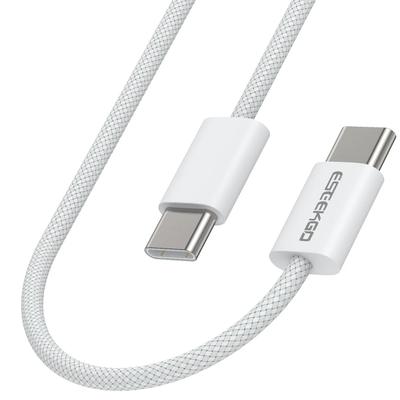
Gibutech 100W USB-C to USB-C braided cable
100W 5A · braided nylon · 30,000+ bend tested · available in white and black
Shop the Gibutech 100W USB-C to USB-C braided cable
Which Gibutech cable is right for you?
Exhibit 4 — Find your cable by need
| If you need to… | Choose |
|---|---|
| Charge a laptop and transfer data or output 4K video | 100W e-marker USB-C to USB-C |
| Fast-charge an Android flagship | 66W USB-C to USB-C |
| Charge phone + tablet from one cable | 60W dual-LED USB-C / Lightning |
| Charge iPhone 14 or earlier from a USB-C charger | 27W Lightning to USB-C |
| Charge iPhone from an older USB-A plug or car | USB-A to Lightning braided |
| Charge a USB-C phone from a USB-A source | USB-C to USB-A braided |
Browse the full range: every Gibutech charging cable, from 27W Lightning to 100W e-marker, in braided black and white.
One good cable beats five cheap ones
The right cable is not about spending more; it is about matching wattage, data and build to what you actually do. Pick the wattage your highest-power device needs, choose a data cable if you transfer files or output video, and insist on braided construction so it lasts. Get those three right and you will not think about charging cables again for years.
Frequently asked questions
What wattage USB-C cable do I need?
Match it to the device you charge most: 27W for any iPhone, 60W for phones and tablets, 66W for Android flagships, 100W for laptops. A 100W e-marker cable → is the safest all-rounder, as it also works at lower wattages.
What is an e-marker chip in a USB-C cable?
An e-marker is a chip inside the cable that tells devices its capabilities. Without it, a cable is capped at 60W and USB 2.0 speeds. The Gibutech 100W e-marker cable → uses it to deliver 100W charging, 20 Gbps data and 4K@60Hz video.
What is the difference between a charging cable and a data cable?
A charging-only cable carries power at USB 2.0 data speeds. A data cable carries fast charging plus high-speed data and video. If you transfer files, use CarPlay or connect to a monitor, you need a data cable.
Can one USB-C cable charge my phone, tablet and laptop?
Yes, if it is rated for the highest-power device. A 100W USB-C to USB-C cable charges laptops at full speed and steps down automatically for phones and tablets, replacing several lower-rated cables.
Do I need a USB-C or Lightning cable for my iPhone?
iPhone 15 and later use USB-C; iPhone 14 and earlier use Lightning. For older iPhones choose a USB-C to Lightning or USB-A to Lightning cable →, ideally MFi certified.
Why do braided cables last longer?
Braided nylon resists fraying at the connector ends where most cables fail. Gibutech braided cables are bend-tested to 30,000+ cycles with reinforced strain relief, far outlasting standard PVC cables.
Sources and notes
- USB Implementers Forum (USB-IF). USB Type-C Cable and Connector Specification Rev 2.1, 2023. E-marker requirement above 60W; USB4 supports 20 Gbps.
- USB-IF. USB Power Delivery Specification Rev 3.1, 2021. Up to 240W; 100W is within standard PD range.
- Apple Inc. "Made for iPhone (MFi) certification." Apple Developer, 2024.
- Product specifications sourced from Gibutech product pages at gibutech.co.uk as of June 2026.


